The platform from the inside

This isn't a promise. It's the real screen.

A walkthrough of ReadyFy exactly as teams use it today. How the AI builds the process, how each step is documented, and how the record becomes defensible.
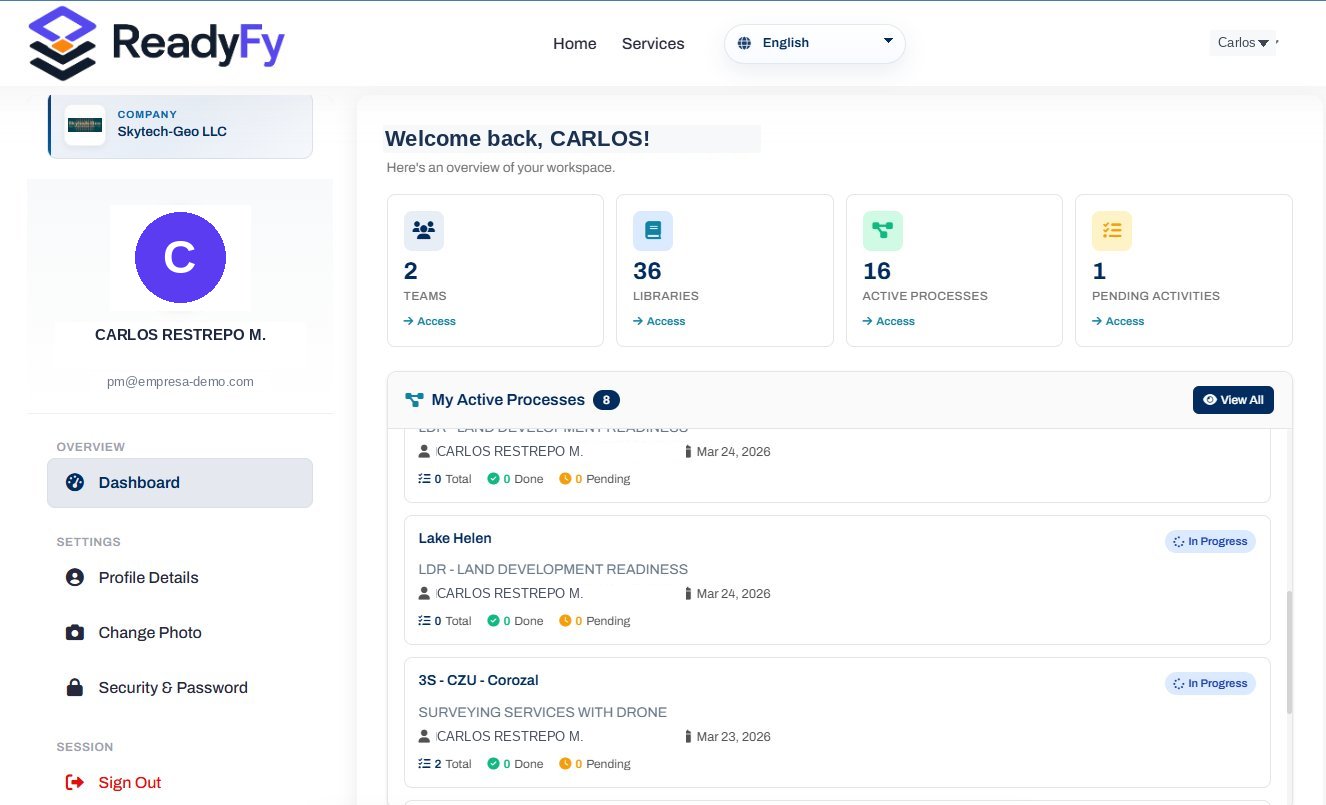
app.readyfy.ai/dashboard
ReadyFy dashboard — workspace overview

Every screenshot on this page comes from the platform in production. No mockups, no smoke.

01
Control center

All your processes, on a single screen.

Every process with its status, progress level, executed budget, and critical dates. The PRR is not a decorative number: it's the real percentage of completed activities against the total.
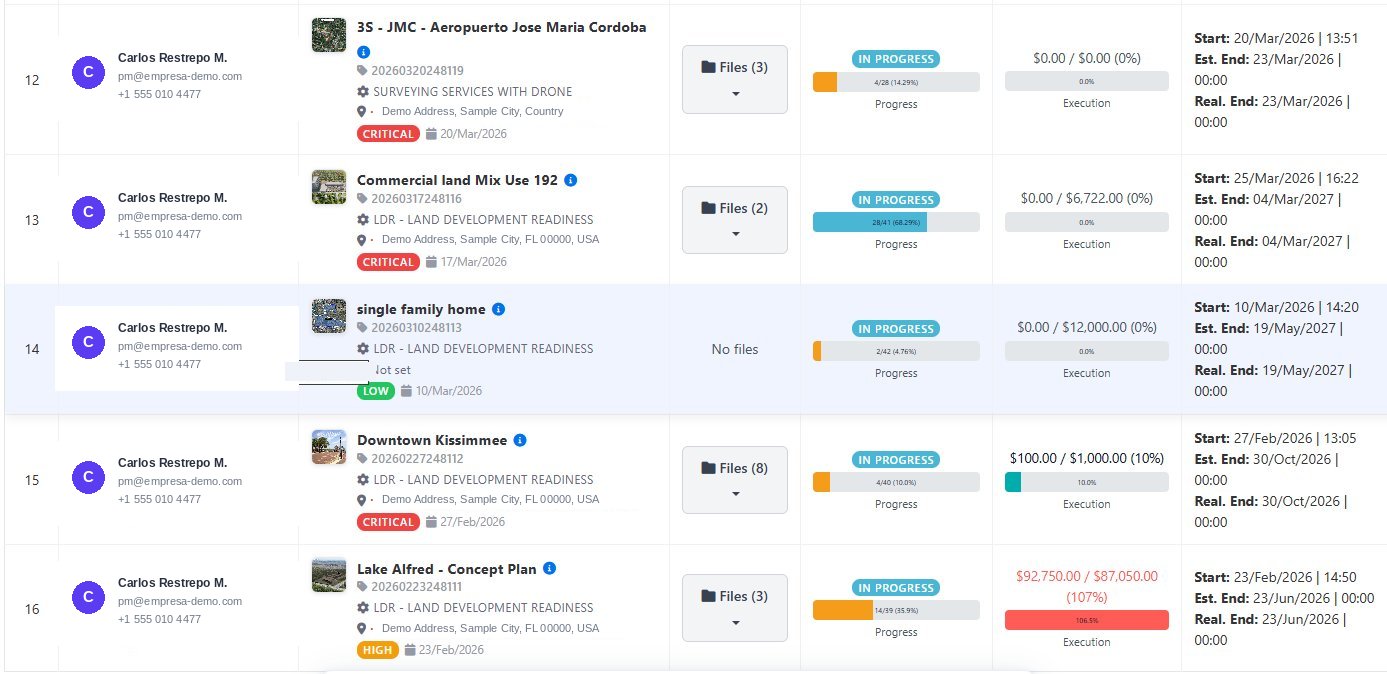
  • Real progress bar. Calculated on closed activities. 24%, 68%, 4% — what's actually done.
  • Live budget. Spent vs. allocated. If it's overrun, it's flagged in red automatically.
  • Priority and due dates. Critical, high, medium. Start dates, estimated end, and actual end.
Process Management
Process management view with progress bars and budget
!
107% executedOverrun detected automatically
02
Artificial intelligence

The AI builds the process. You perfect it.

Specify the process type and the applicable regulation. The AI proposes the phases, the activities in logical order, and the dependencies between them. You reorder, add, remove, and save it as your own reusable library.
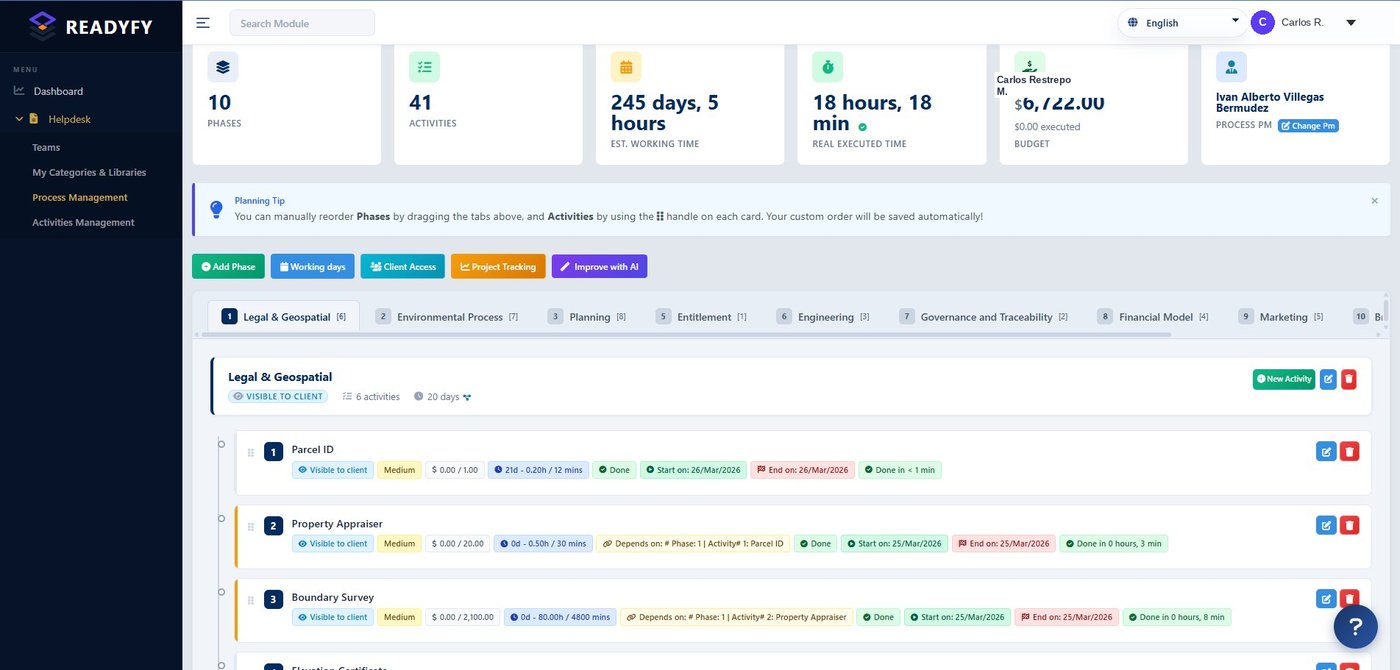
  • "Improve with AI" builds phases and activities according to the regulation you specify.
  • Real dependencies. "Depends on: Phase 1, Activity 2" — the schedule isn't decorative.
  • Client-visible per activity. You decide what each person sees.
Planning Board
Planning Board with phases, activities, dependencies, and the Improve with AI button
Improve with AI10 phases · 41 activities
03
Schedule

A Gantt that breathes with the project.

Every activity on its timeline, with its status color. Pending, in progress, completed, blocked. Hover to see the phase, owner, dates, and duration of each task.
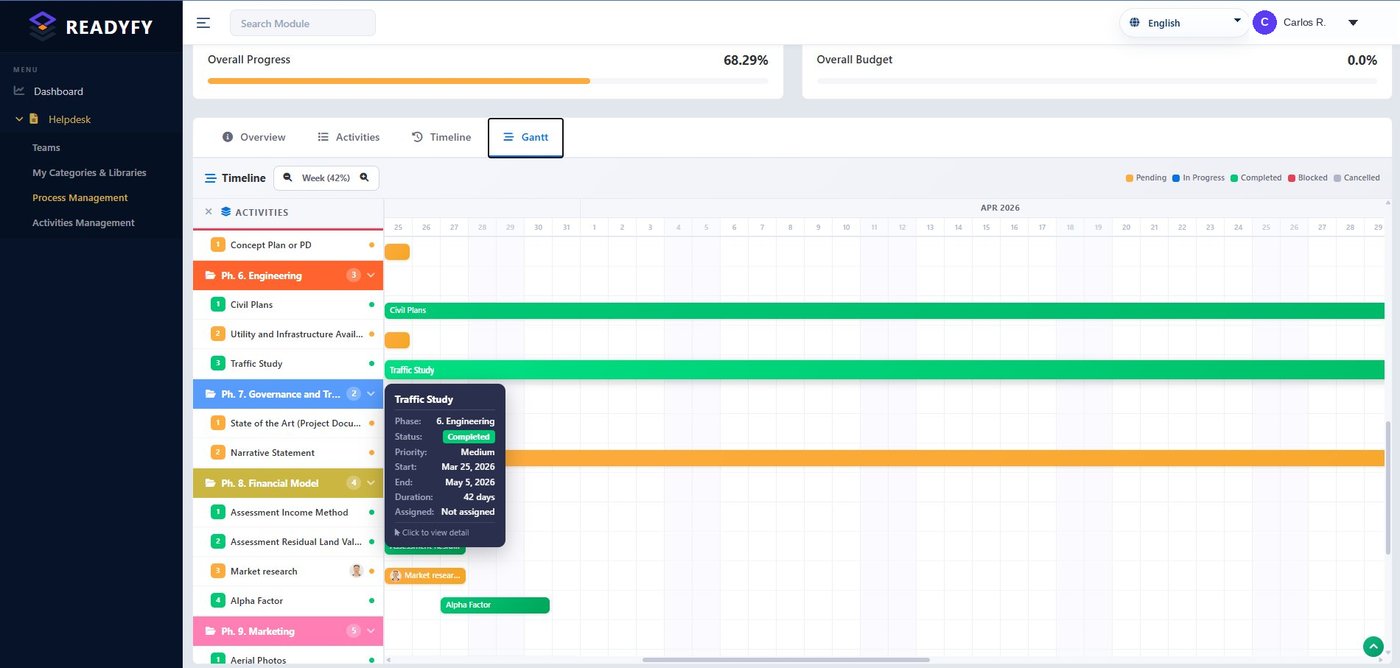
  • Color-coded states. Green completed, orange pending, red blocked. At a glance.
  • Overall progress. The % of the entire project, calculated in real time.
  • Visible to client and inspector. The same schedule, without status meetings.
Gantt · Timeline
Project Gantt with color-coded status bars
68.29%Overall project progress
04
Daily work

Your work board. Like notes that move on their own.

Drag a card from "Pending" to "In Progress" to "Completed." Upload reports, notes, reviews, and costs to each activity. Blocked dependencies are flagged in red: you can't advance until the prerequisite is ready.
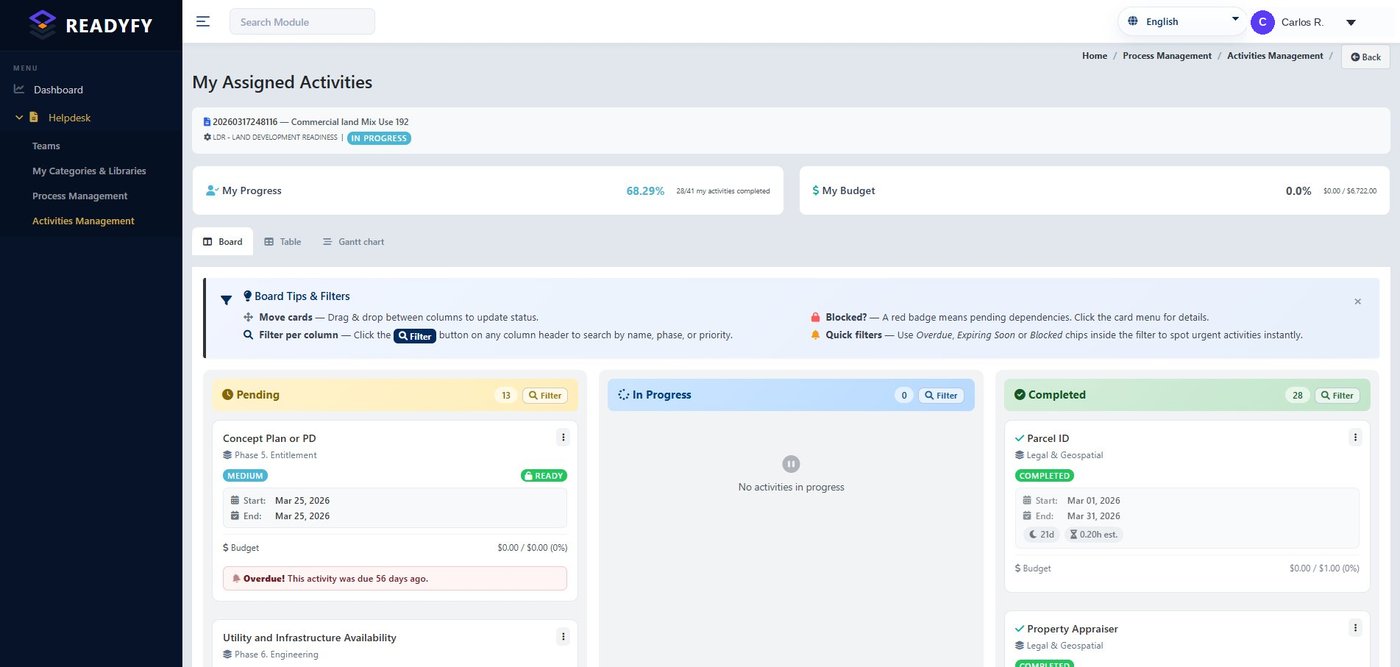
  • Drag-and-drop Kanban. Moving a card updates the status instantly.
  • Due-date alerts. "Overdue by 56 days" — nothing slips through.
  • Clear badges. Ready, overdue, blocked, completed. No ambiguity.
Activities · Board
Kanban board of assigned activities
Overdue by 56 daysAutomatic alerts
05
Client view

The client stays informed. Without interrupting you.

The client, inspector, or authorized visitor logs in and views the process documents, organized by activity, with their descriptions and notes. You decide exactly which files you share. No cost for those who view.
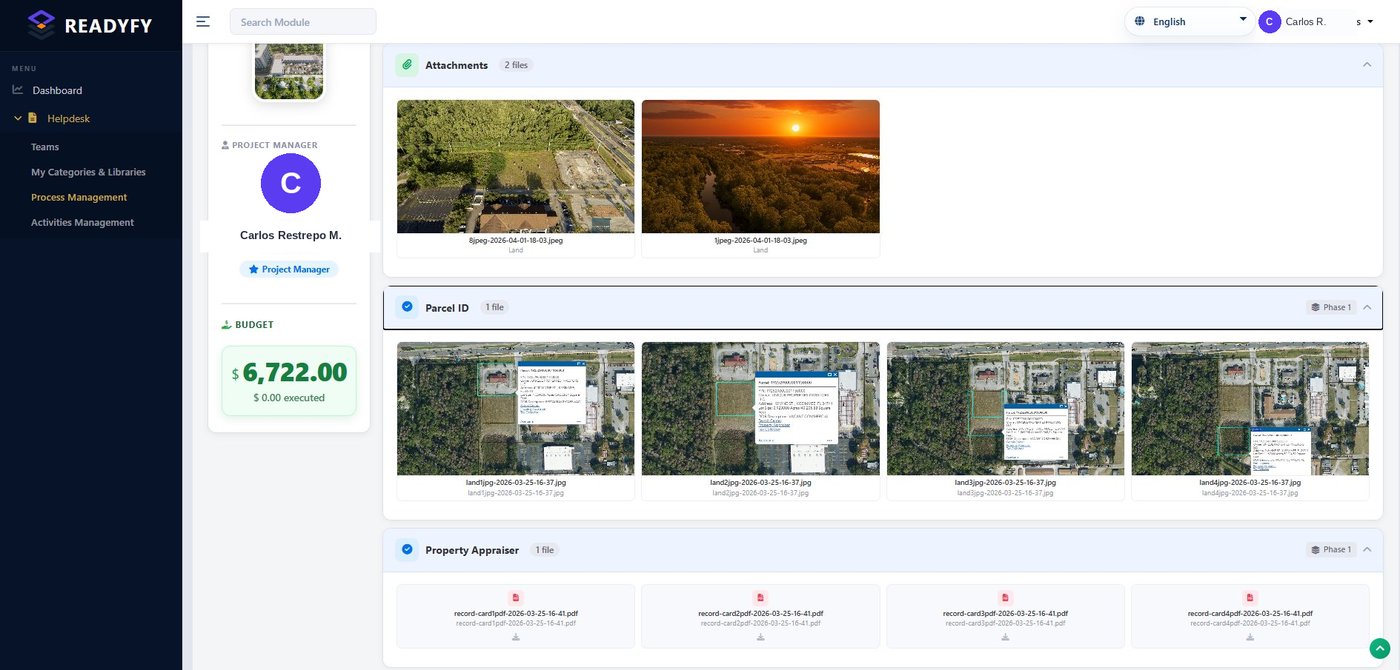
  • Attachments per activity. Every document linked to its stage, with description and notes.
  • You choose what's visible. Full control over which files are visible.
  • Free to view. The client self-informs without consuming your time.
Client view
Client view with attachments organized by activity
06
Traceability

The black box. The record gives it away.

Every time someone enters the project, it's recorded: date, user, email, and IP. No one can claim they reviewed the information without doing so — nor deny that they saw it. Exportable to Excel, ready for an audit.
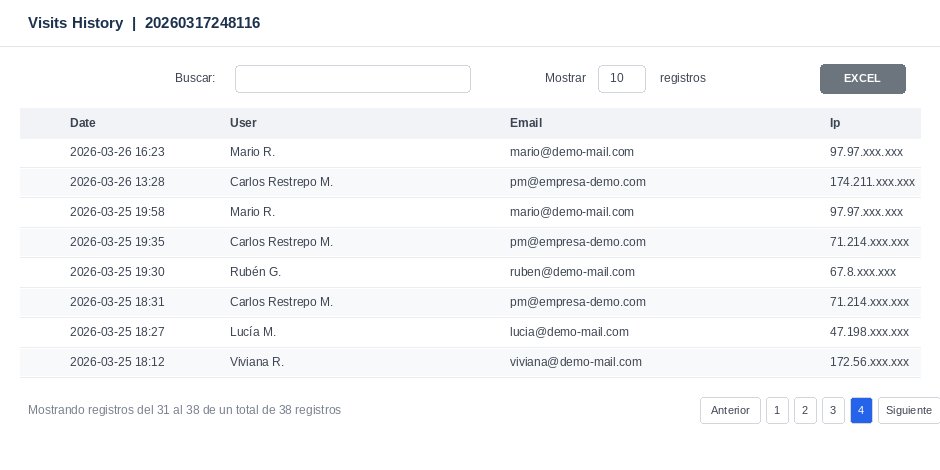
  • A record of every access. Date, user, email, and IP. Indelible.
  • Defensible evidence. Who saw what and when. No room for argument.
  • Exportable to Excel. The access record, ready to hand over.
Visits History
Visits log with date, user, email, and IP
38 accesses recordedNothing is deleted
// Geolocation

All your projects. On the map.

See where each process is in the world. Click a marker and go straight into the project. From Florida to Colombia, your entire portfolio in a single view.
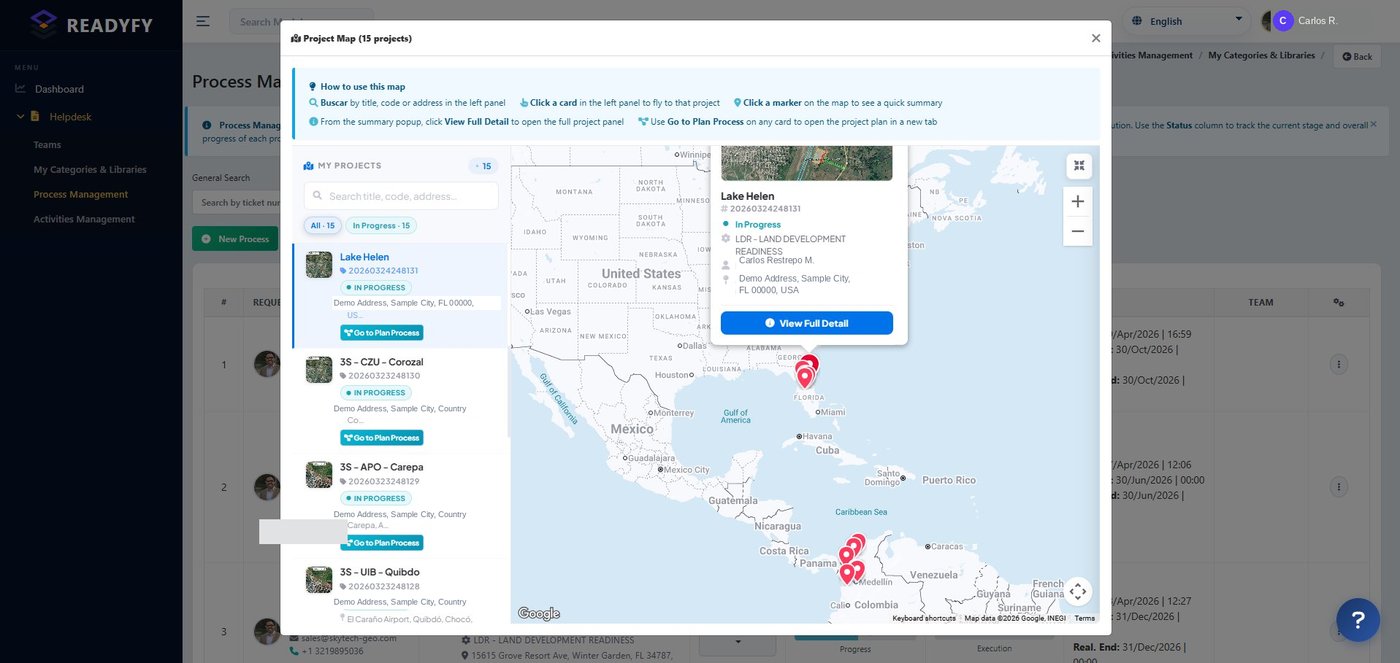
Project Map · 15 projects
Map of geolocated projects
The closeout

Thousands of pages. One package. Paginated and certified.

When the process closes, ReadyFy assembles the complete record: a single PDF, in order, with every page numbered, an auto-generated index, and an integrity seal on each page. If anyone alters a single page, ReadyFy detects it.

Default
ReadyFy Verified

Proprietary integrity seal. Embedded SHA-256 hash.

Regulated processes
PAdES · eIDAS

Advanced electronic signature with timestamp.

ReadyFy certifies document integrity and process status. It does not certify the truthfulness of the content — that rests with the signing professional.

Available at launch · June 2026
expediente_certificado_RFY.pdf 1,247 pages
ReadyFy RFY-2026-0184
Final record
Process Record · Index
// Automatically generated
  • 1. Cover page and process datap. 1
  • 2. Legal & Geospatial Phasep. 12
  • 3. Studies and permitsp. 87
  • 4. Evidence by activityp. 234
  • 5. Certified documentsp. 612
  • 6. Chronological logbookp. 1,210
  • 7. Access recordp. 1,240
ReadyFy Verified FOLIO 0001 / 1247 SHA · 4a7b...c91f
// Glossary

The language of ReadyFy, in one pass.

PRR

Readiness Rating

The real progress percentage: completed activities over the total. A number anyone understands.

Dependencies

Logical precedence

A blocked activity doesn't advance until its prerequisite is ready. The schedule reflects reality.

States

Pending → Completed

Every activity has a clear state: pending, in progress, blocked, completed, cancelled.

Logbook

Immutable record

Every action with author, date, and time. The process timeline that no one can tamper with.

Roles

Who sees what

Owner, PM, consultant, client, inspector. Each role with its defined access level.

Certification

Defensible package

The final record, paginated and sealed. Ready for an audit, a judge, or an investor.

See ReadyFy with your own process.

20 minutes. We'll show you the platform applied to your industry, in your language, with your real processes.